Website Getting Traffic but No Enquiries? 10 Problems to Fix
Is your website getting visitors but not generating enquiries?
You may be investing in SEO, Google Ads, or social media marketing. However, visitors leave your website without calling, sending a message, or submitting a form.
This can waste your marketing budget.
The problem may not be your traffic. Your website may fail to explain your services, build trust, or guide visitors towards the next step.
In this guide, we explain 10 reasons why websites fail to generate enquiries. We also show you what to fix to improve your chances of converting visitors into potential customers.
Why Does a Website Get Traffic but No Leads?
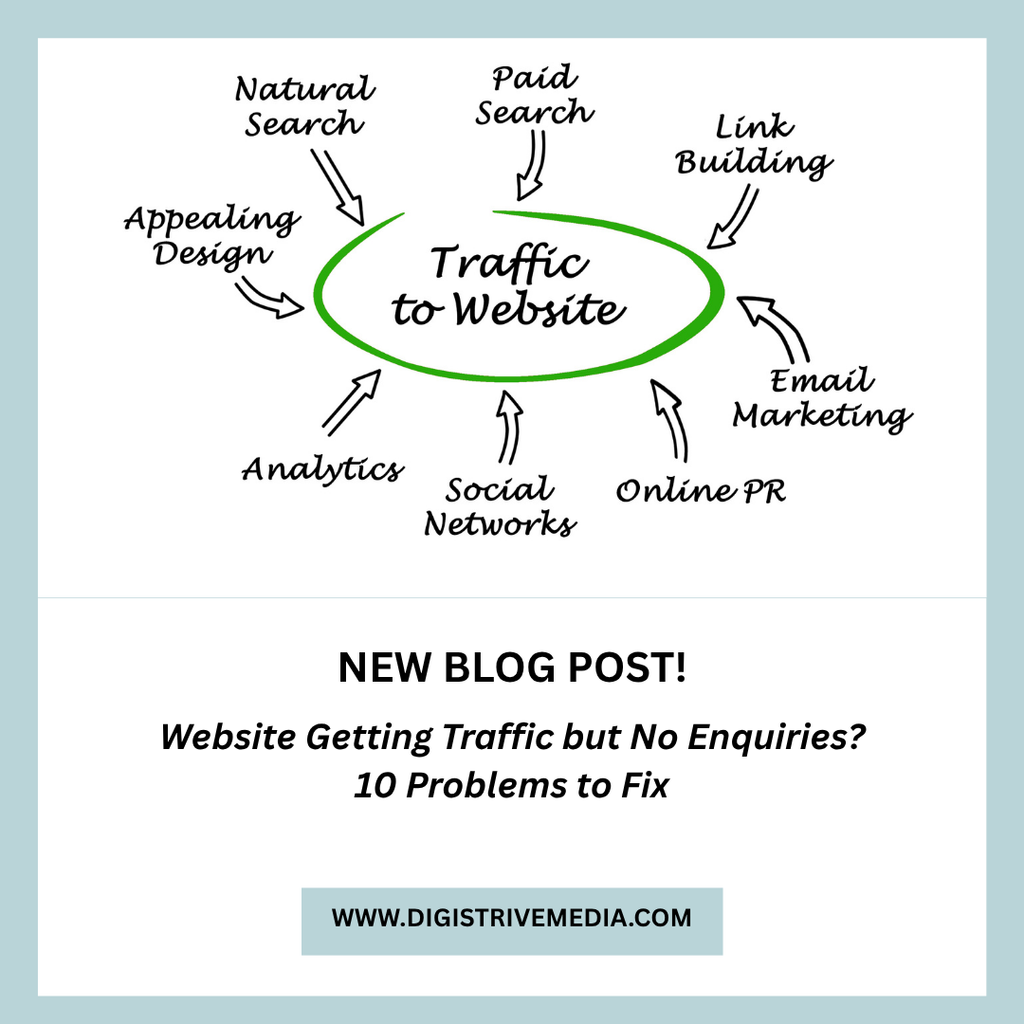
Website traffic and lead generation are two different things.
Traffic shows how many people visit your website. Lead generation measures how many visitors take a meaningful action, such as submitting an enquiry or requesting a quotation.
For example, 1,000 visitors may reach your website in a month. If none contacts your business, the website is not producing the outcome you need.
However, the solution is not always to attract more visitors.
First, check whether your website reaches the right audience. Next, review how clearly it presents your services and encourages visitors to enquire.
1. Your Website Does Not Explain What You Offer
Visitors should understand your business within a few seconds.
If your homepage uses vague statements, people may struggle to understand your services.
For example, a headline such as “Innovative Digital Solutions” does not clearly explain what your business provides.
A more specific headline could be:
Website Development and Digital Marketing for Growing Businesses
This tells visitors what you offer and who you serve.
Your homepage should answer three questions:
- What services do you provide?
- Which customers do you help?
- What should visitors do next?
Keep your message simple. Place your main service and primary call to action near the top of the page.
2. Your Website Attracts the Wrong Audience
Not every visitor is a potential customer.
For example, a software development website may attract students looking for tutorials. A marketing agency may receive visits from people searching for jobs.
These visitors may increase traffic without generating business enquiries.
Review the search queries and advertising campaigns that bring people to your website.
Then compare those queries with your actual services.
If you run Google Ads, review your search terms and exclude irrelevant searches where appropriate. If you rely on SEO, create pages that target relevant commercial searches.
Focus on attracting people who need your services rather than increasing traffic alone.
3. Your Website Has No Clear Call to Action
A call to action tells visitors what to do next.
Without one, potential customers may read your content and leave without contacting you.
Use specific calls to action that match the service.
For example:
- Get a Website Development Quote.
- Discuss Your Software Project.
- Request a Digital Marketing Consultation.
- Enquire About E-commerce Development.
Place the primary CTA where visitors can find it easily.
You can also repeat it after important sections of the page. However, avoid filling every section with competing buttons.
One clear next step is often more effective than several unrelated options.
4. Your Website Does Not Build Enough Trust
Customers may hesitate to contact a business they do not know.
Your website should help visitors understand why they can trust your company.
Consider adding:
- Genuine customer testimonials.
- Relevant project examples.
- Case studies with accurate results.
- Clear service descriptions.
- Company information.
- Contact details.
- Transparent project processes.
For example, a website development agency can show completed projects and explain the features delivered.
A digital marketing agency can present campaign results with the relevant time period and context.
Use only genuine evidence. Avoid unsupported claims or fabricated testimonials.
Trust signals should help visitors make an informed decision.
5. Your Website Is Difficult to Use on Mobile
Many people browse websites on smartphones.
If your website is difficult to use on a small screen, visitors may leave before contacting you.
Check the following:
- Is the text easy to read?
- Do buttons work properly?
- Can visitors complete forms easily?
- Is the phone number clickable?
- Does the page load without unnecessary delays?
- Do images and sections fit the screen?
Test the website on different mobile devices.
Pay particular attention to the enquiry process. A form that works on a desktop may still have problems on a phone.
Fixing these issues can remove barriers between visitors and your business.
6. Your Website Loads Slowly
A slow website can frustrate visitors.
Large images, unnecessary scripts, poor hosting, and inefficient code can affect loading speed.
Start by testing important pages with Google’s PageSpeed Insights.
Review both mobile and desktop performance.
Common improvements include:
- Compressing large images.
- Using suitable image formats.
- Reducing unnecessary scripts.
- Improving caching.
- Reviewing hosting performance.
- Removing unused website components.
Do not focus on a single speed score alone. Test real page behaviour and prioritise problems that affect usability.
A faster website can provide a better user experience, but speed improvements alone do not guarantee more leads.
7. Your Enquiry Form Is Too Complicated
A complicated form can discourage potential customers.
Visitors may abandon the process if they must complete too many fields.
Start with the information your team needs to respond.
For example, a basic business enquiry form may ask for:
- Name.
- Phone number or email.
- Service required.
- Brief project details.
You can ask additional questions when they help qualify a project.
For example, a custom software enquiry may include an optional project budget range.
Make the form easy to complete. Use clear field labels and show a confirmation message after successful submission.
Also, test whether enquiries reach the correct email inbox or CRM.
8. Your Landing Page Does Not Match Your Advertisement
If you run paid advertising, the landing page should match the advertisement.
Imagine that a visitor clicks an ad for e-commerce website development. The visitor then reaches a homepage that lists unrelated services.
This creates confusion.
Instead, direct the visitor to a relevant page that explains the e-commerce service, key features, process, and next step.
The same principle applies to software development and digital marketing campaigns.
Each page should focus on one main customer need.
You can explore Digistrive Media’s digital marketing services to see the type of service page that can support a relevant campaign.
9. Your Website Content Does Not Answer Customer Questions
Potential customers often have questions before they enquire.
They may want to know about pricing, project timelines, features, or the development process.
If your website does not address these questions, visitors may continue researching other providers.
Create useful content around your customers’ main concerns.
For example, a website development page could explain:
- What the project includes.
- How the process works.
- Which factors affect pricing.
- How long development may take.
- What support is available after launch.
Blog articles can answer more detailed questions. They can also direct interested readers to the relevant service page.
Read our guide on SEO blog posts that drive leads for more information.
10. You Are Not Tracking Website Enquiries Properly
Sometimes, a website generates enquiries but the tracking system does not record them correctly.
For example, a contact form may send an email without triggering a conversion event.
This can make your website or advertising campaign appear less effective than it actually is.
Check the full enquiry process.
- Submit a test enquiry.
- Confirm that the form succeeds.
- Check that the message reaches the correct destination.
- Verify that the conversion event is recorded.
- Confirm that the same enquiry is not counted multiple times.
Track meaningful actions, such as completed forms, calls, bookings, and purchases.
Where possible, also record which enquiries become qualified leads and paying customers.
This helps you make better marketing decisions.
How to Turn More Website Visitors into Enquiries
Once you identify the problems, create a practical improvement plan.
Step 1: Review Your Important Pages
Start with your homepage and the service pages that receive the most traffic.
Check whether each page explains the service clearly and includes a relevant CTA.
Step 2: Check Your Traffic Sources
Use Google Search Console and your analytics tools to understand where visitors come from.
Identify pages that receive traffic but generate few enquiries.
Then review the search intent and content of those pages.
Step 3: Improve the Enquiry Journey
Make it easy for visitors to contact your business.
Use a clear form, a clickable phone number, or a WhatsApp option where appropriate.
Remove unnecessary steps from the process.
Step 4: Add Relevant Proof
Include genuine customer feedback, project examples, or case studies.
Place this information near the sections where visitors evaluate your service.
Step 5: Test One Improvement at a Time
Start with the most obvious problem.
For example, clarify the main headline or simplify the enquiry form. Then monitor the results.
Changing many elements at once makes it harder to identify which improvement helped.
How to Measure Website Lead Generation
Track more than the number of visitors.
The following metrics can help you evaluate performance.
| Metric | What it tells you |
|---|---|
| Website visitors | How many people visit your site |
| CTA clicks | How many visitors engage with your enquiry options |
| Form submissions | How many enquiries are submitted |
| Conversion rate | The percentage of visitors who complete the desired action |
| Qualified leads | How many enquiries match your target customers |
| Sales generated | How many enquiries become paying customers |
For example, a page may receive fewer visitors than another page but generate more qualified enquiries.
That page may deserve greater attention because it attracts visitors who are more likely to become customers.
Use actual data to decide which pages to improve.
How Digistrive Media Can Help
Digistrive Media provides website development, digital marketing, and software development services for businesses.
If your website attracts visitors but generates few enquiries, the first step is to identify where potential customers leave the process.
The review may include page messaging, mobile usability, enquiry forms, calls to action, and conversion tracking.
The recommended changes will depend on your website and business goals.
Explore our digital marketing services and visit the Digistrive Media website to learn more.
Is your website getting visitors but not enough enquiries? Request a website conversion review from Digistrive Media. Share your website URL and the main problem you are facing so the review can focus on your requirements.
Frequently Asked Questions
Why is my website getting traffic but no enquiries?
Possible reasons include irrelevant traffic, unclear messaging, weak calls to action, poor mobile usability, complicated forms, and technical problems. Review the entire journey from the visitor’s first click to the enquiry.
How can I increase website enquiries without increasing traffic?
Improve the pages you already have. Clarify your offer, add relevant proof, simplify forms, and make contact options easier to find. Track conversions to identify which changes work.
Does website design affect lead generation?
Yes. Navigation, readability, mobile usability, page speed, and the placement of calls to action can affect how easily visitors understand your offer and contact your business.
Should every blog page have a contact form?
Not necessarily. Each page should have a relevant next step. An informational article may link to a related service page, while a commercial article may benefit from a more direct enquiry form.
How do I know which website pages generate leads?
Configure analytics events for successful form submissions, calls, or other meaningful actions. Where possible, connect those events to a CRM or lead tracking system.
Can SEO alone generate business enquiries?
SEO can attract relevant visitors through search engines. However, enquiries also depend on search intent, competition, your offer, website experience, and the ease of contacting your business.
Conclusion
A website can receive visitors without generating business enquiries. The cause may be irrelevant traffic, unclear messaging, poor usability, or a difficult enquiry process.
Start by identifying the biggest barrier. Then improve your service pages, calls to action, forms, and conversion tracking.
Measure the results and continue improving the pages that attract your target customers.
Your website should do more than attract visitors. It should make it easy for potential customers to understand your services and enquire.